
Skip to content
Generator Monitoring

Every generator on every site, read straight off the controller

Live engine, electrical and fuel readings from every generator on every site, straight off the controller

At a glance

Status
Built for a client, running in production
Built on
ASP.NET Core · SQL Server · Teltonika TRB145 over Modbus · REST API for ERP integration · Role-based access
Covers
6 areas
44
Fields captured per reading
3-phase
Voltage, current and load, per line
7
Report types, detailed and summary
The difference

What it changes for whoever uses it

  • You see a problem while the generator runs, not in a report afterwards
  • Fuel per site, counted by the controller instead of copied from a logbook
  • The running-hour and fuel numbers you need to decide overhaul or replace
  • Readings post straight into the ERP you already run
  • Every site in one view, and a site supervisor sees only their own yard
One reading

What it keeps, for every reading

GEN-001CAT C15 · 400 kVASharqia yard

Engine

RPM1 500
Operating hours4 812.6
Oil pressure4.1 bar
Coolant temp84 °C
Battery27.4 V

Electrical

Total kW318.4
Total kVA372.1
Power factor0.86
Frequency50.0 Hz
Load79.6 %

Per phase

 L–LL–NCurrent
L1398 V231 V461 A
L2401 V232 V457 A
L3399 V230 V463 A
Fuel total 18 942 LInstant 61 L/hNominal
Connectiononline · updated 4s agono reading for 11 min — offline session opened

The gateway timestamp and the controller timestamp are both stored, so a dead gateway does not read as a stopped generator.

Drawn from the platform’s own fields, not a screenshot. The real data belongs to the client whose generators these are.
The running system

What it looks like in use

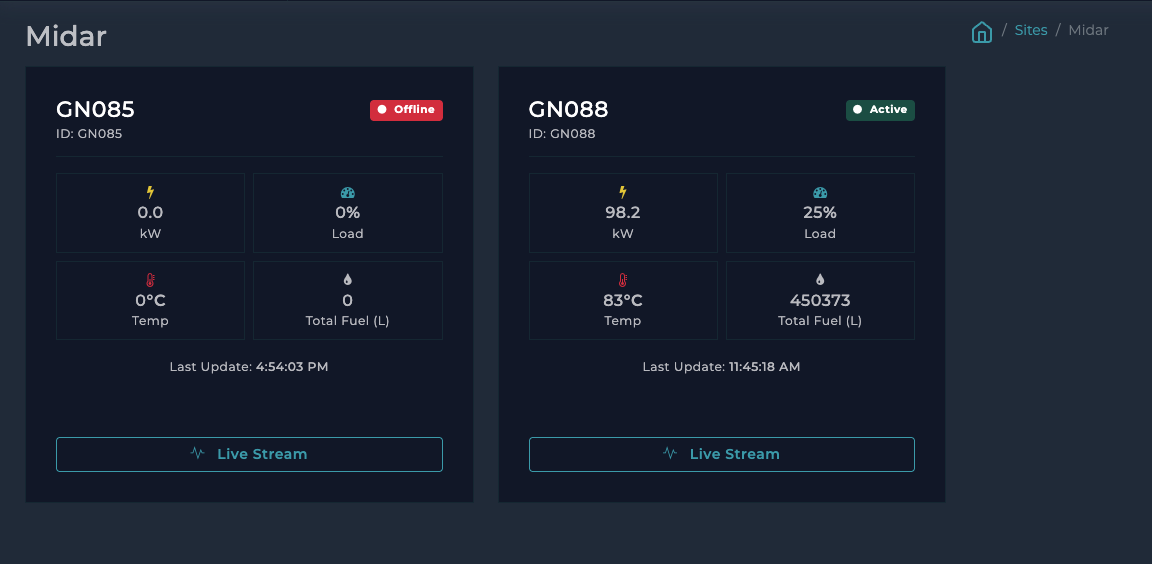
A site with two generators: one running at 98.2 kW and 25% load, one offline. The offline card keeps its last reading, so you can see what it was doing when it stopped.
01A site with two generators: one running at 98.2 kW and 25% load, one offline. The offline card keeps its last reading, so you can see what it was doing when it stopped.
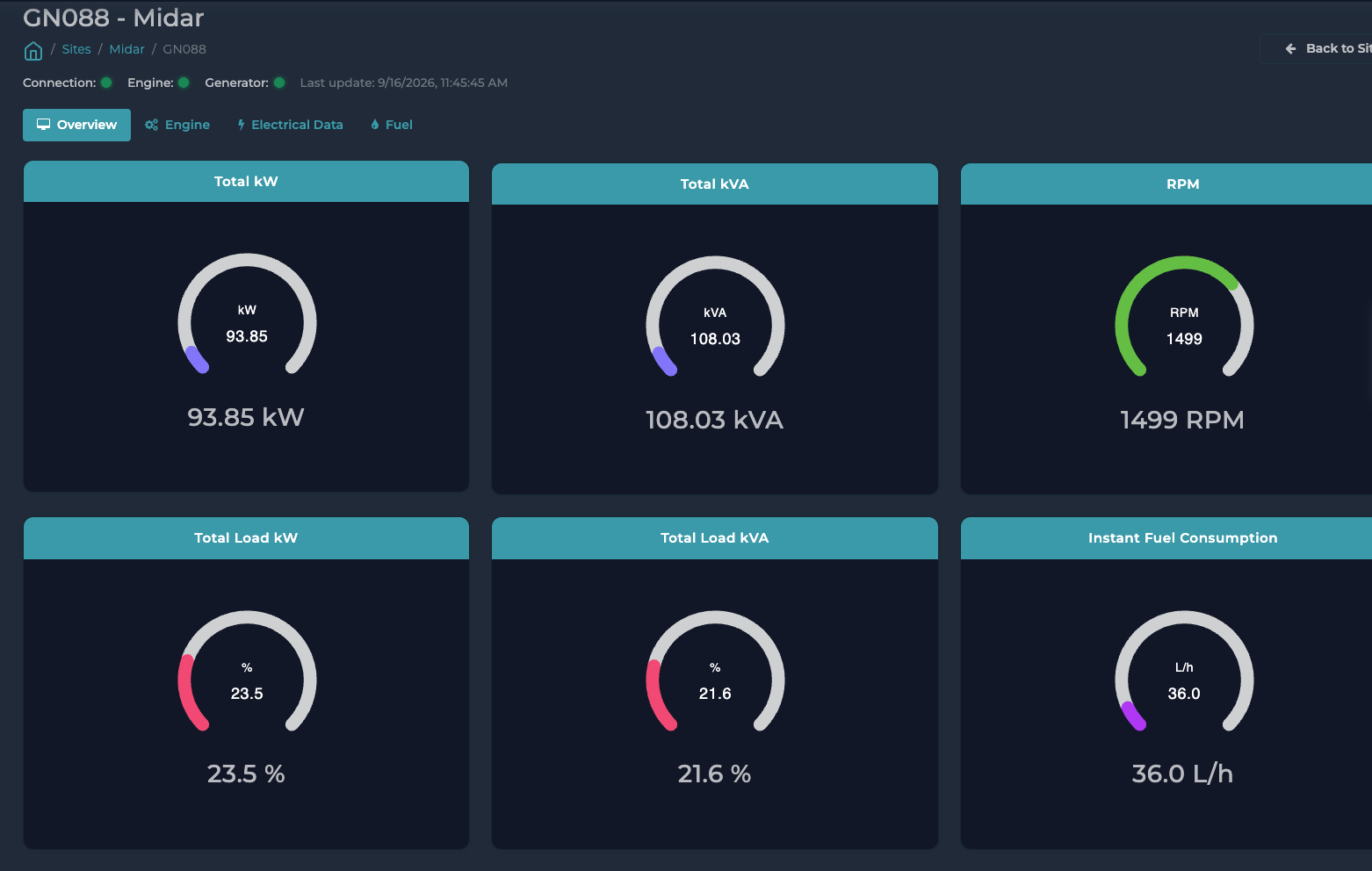
One generator: power, RPM, load and fuel use, with its connection and engine status and the time of the last reading.
02One generator: power, RPM, load and fuel use, with its connection and engine status and the time of the last reading.
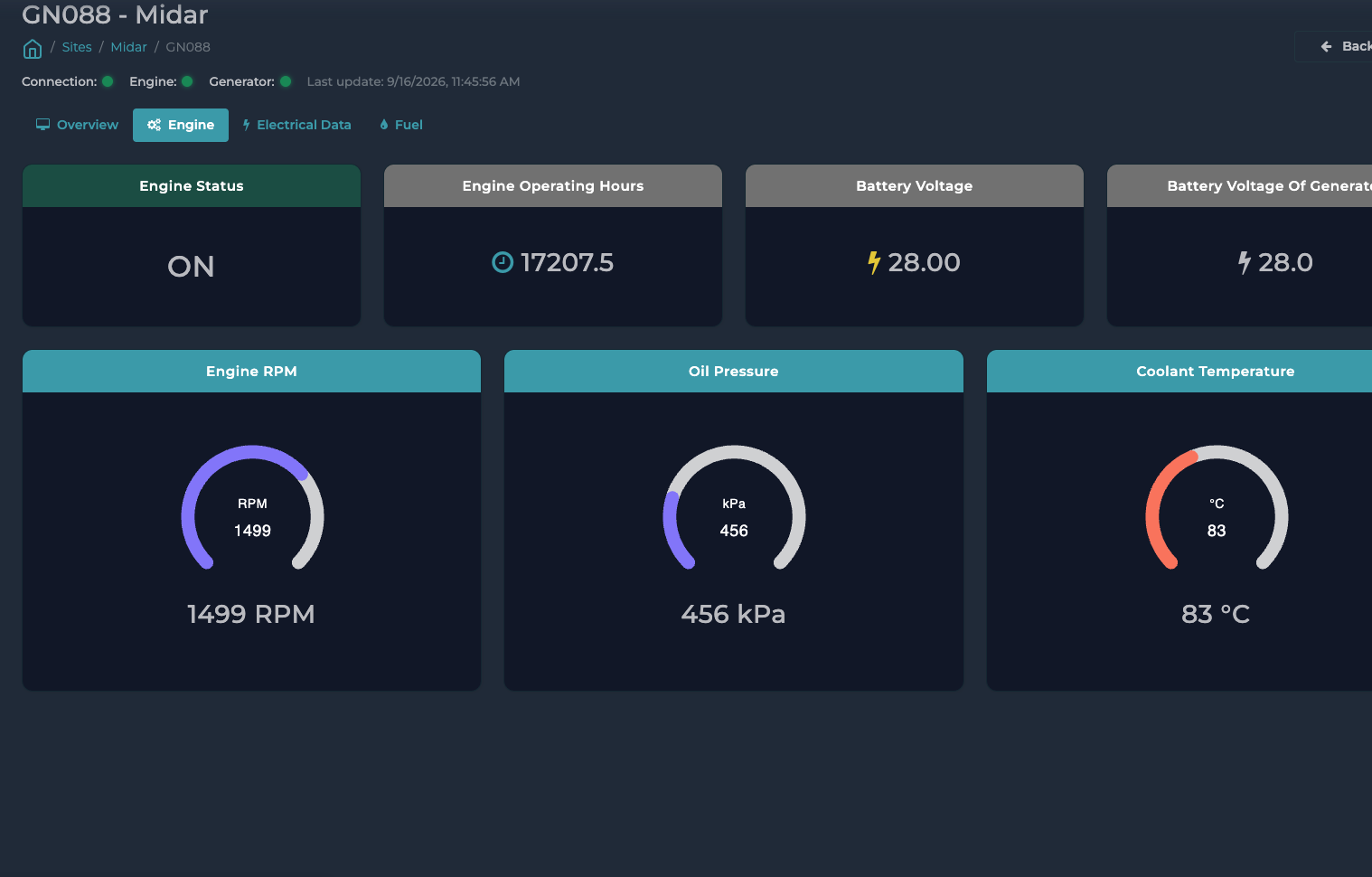
The engine tab: running hours, both battery voltages, and gauges for RPM, oil pressure and coolant temperature.
03The engine tab: running hours, both battery voltages, and gauges for RPM, oil pressure and coolant temperature.
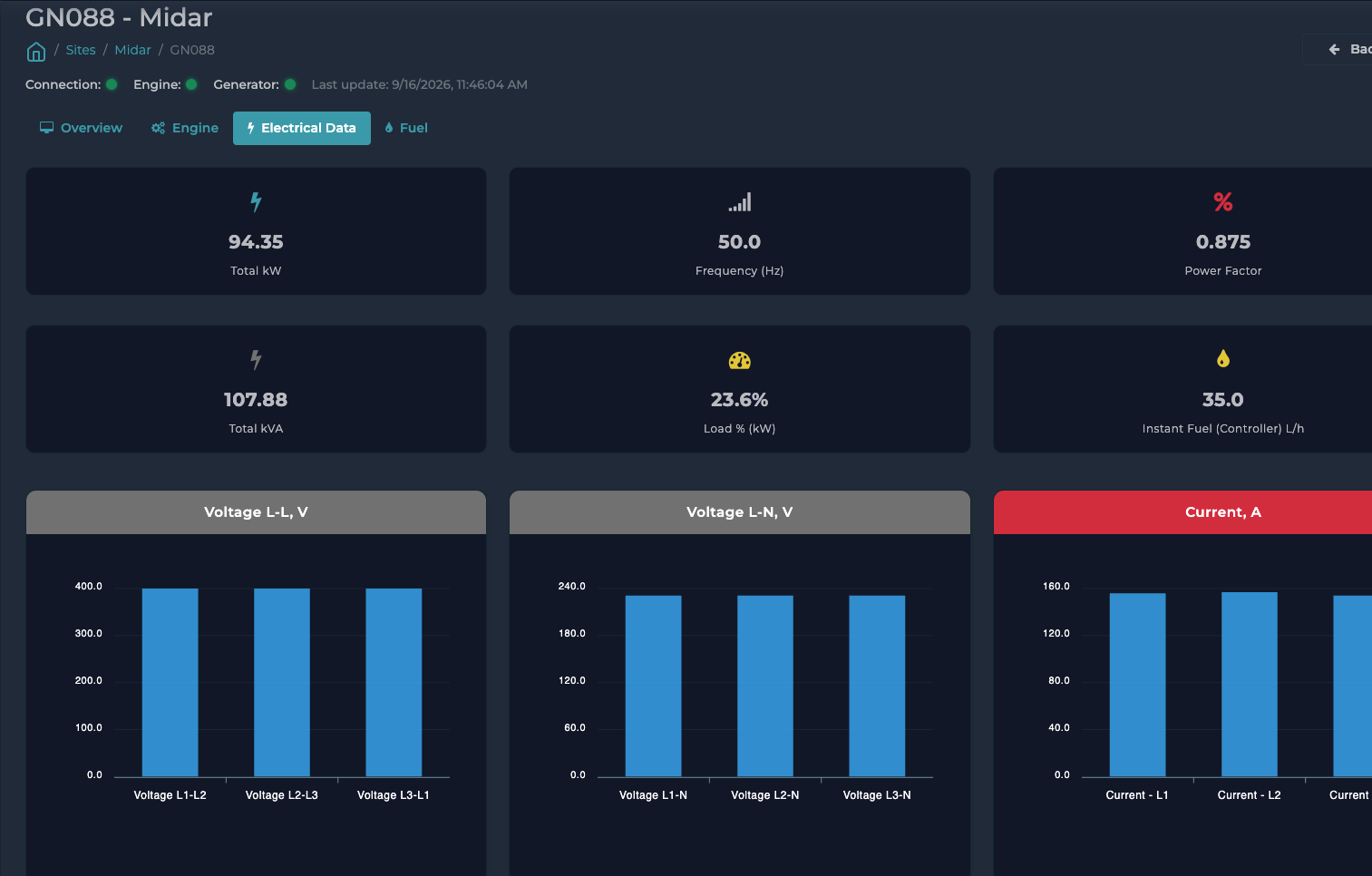
The electrical tab: frequency and power factor, then voltage and current charted for each of the three phases.
04The electrical tab: frequency and power factor, then voltage and current charted for each of the three phases.
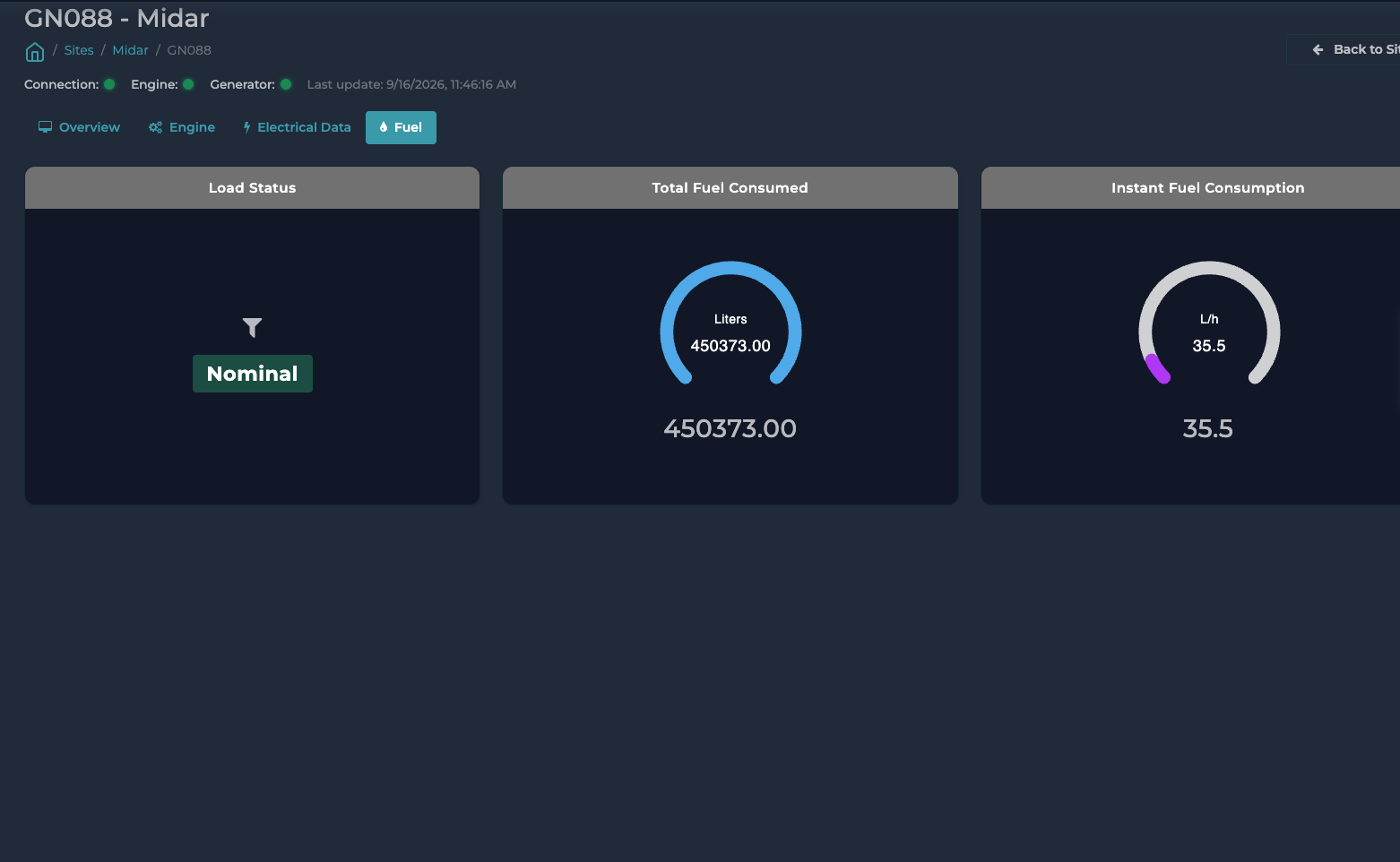
The fuel tab: load, the total litres counted by the controller, and fuel use right now.
05The fuel tab: load, the total litres counted by the controller, and fuel use right now.
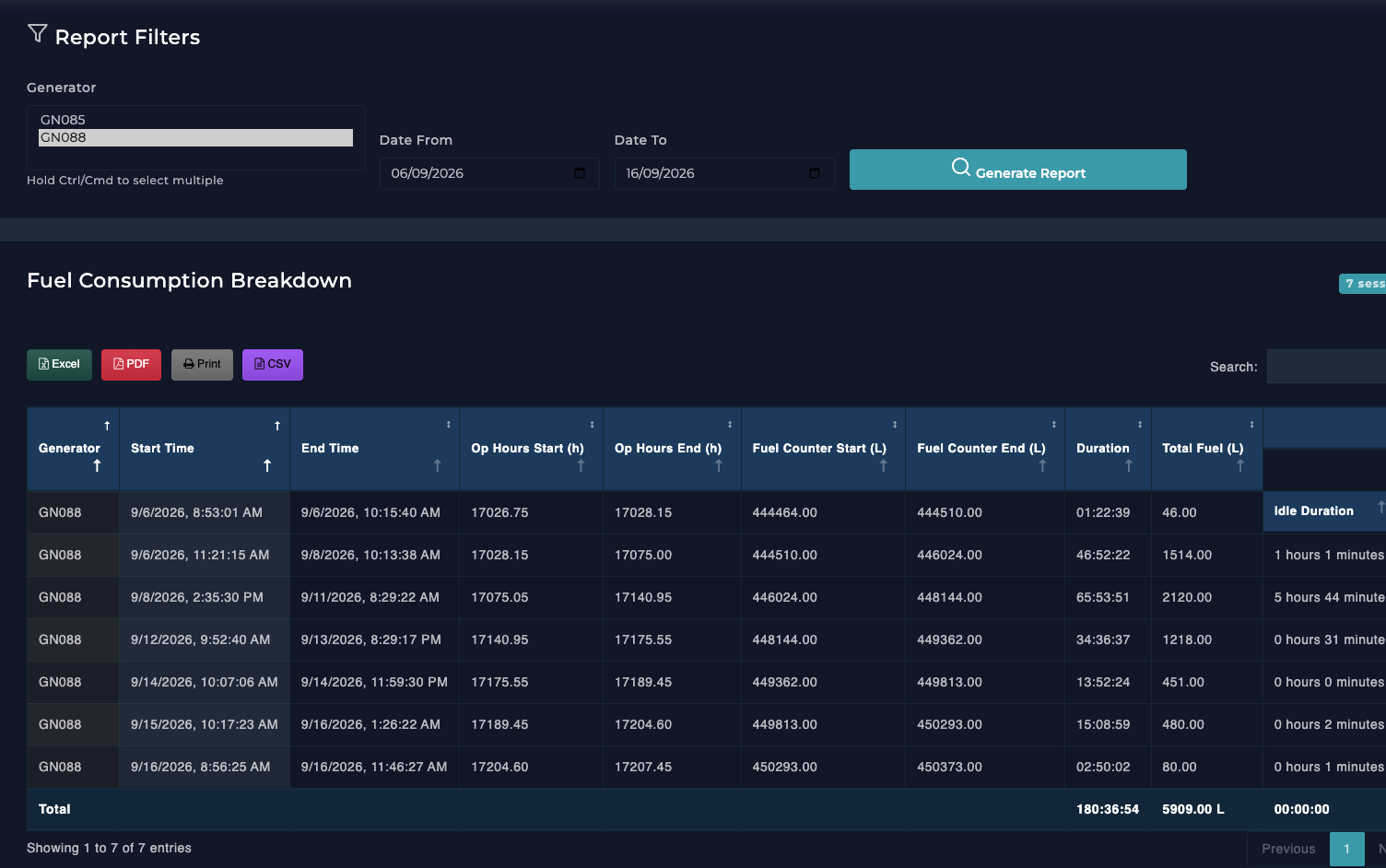
The fuel report: one row per running session, with litres burned and idle time. It exports to Excel, PDF or CSV, because whoever needs it works in a spreadsheet.
06The fuel report: one row per running session, with litres burned and idle time. It exports to Excel, PDF or CSV, because whoever needs it works in a spreadsheet.
Inside

What is inside Generator Monitoring

01

Reads the controller, not a person

A gateway beside each generator reads its controller directly and sends every reading in. Nobody writes a number on a clipboard.

02

Every reading that matters

Engine, electrical and fuel together: RPM, oil pressure, coolant, battery, kW and kVA, power factor, and voltage and current on each of the three phases.

03

Offline sessions

The report nobody asks for until they need it. Every time a generator stopped reporting, listed. It is how you find a gateway that has been dead for a fortnight.

04

Detail for engineers, summaries for finance

Engine and electrical each get a detailed and a summary report. The engineer and the finance manager do not want the same document.

05

Straight into your ERP

The same readings over a documented API, so fuel and running hours post into Odoo or whatever you run, instead of living in one more system nobody opens.

06

Numbers a decision can rest on

Litres per running hour, per machine, from the machine's own counters. That is the number behind "overhaul or replace" and "was that fuel delivery the size we paid for".

Why it exists

A generator either ran or it did not, and either burned the fuel the log says or it did not. Both facts sit in the generator's own controller, and on most sites nobody reads them. The record is a clipboard, filled in by whoever remembered, and checked against a fuel invoice weeks later.

Why live readings matter

A daily summary tells you a generator ran. It does not tell you the coolant climbed for two hours before it stopped, or that one phase has carried more current than the other two since Tuesday. Those are the readings that become a repair before they become a failure.

It also knows a stopped generator from a stopped gateway. Both look the same on a screen that only shows the last value, so it keeps two timestamps: when the reading was taken, and when the controller last changed.

What it does not do

It does not control anything. It reads, records and reports. Nothing in it can start or stop a generator, on purpose: a system that can act can also start a machine nobody is standing next to.

Next step

Tell us what is broken. We will tell you what we would do.

A call, then a written recommendation. No obligation.

  • A reply within one working dayFrom an engineer.
  • We look before we quoteA call, and a site visit if needed.
  • The recommendation is yoursYours to take elsewhere.
  • Or call +20 109 777 8090